
Make Your Island Work: A Quick Overview
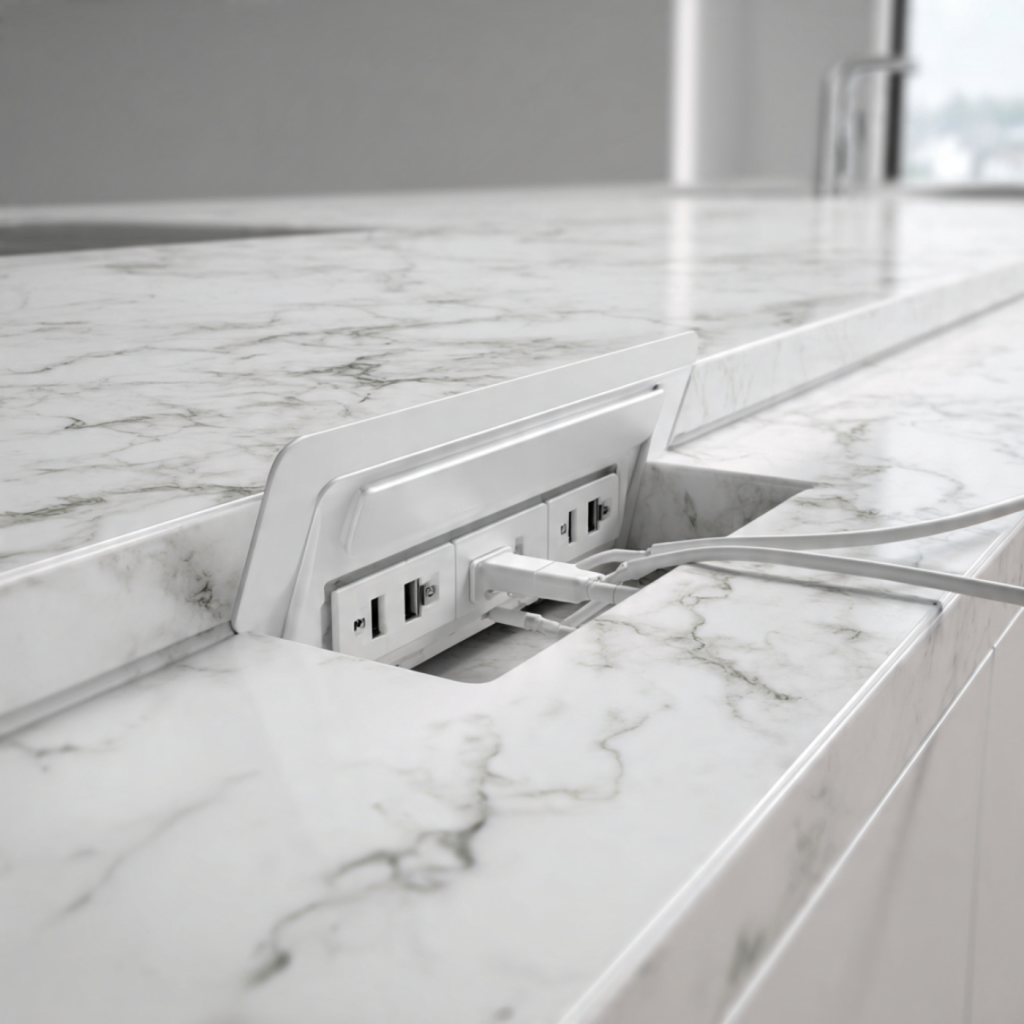
Want your kitchen island to be beautiful AND highly functional? An in-counter pop-up power station gives power when needed and hides when you don’t. It keeps cords off the surface, reduces trip hazards, and preserves clean sightlines.
You will learn how to choose the right unit for your needs and countertop, plan the cutout and wiring, and follow installation steps or hire pros. You’ll also get maintenance tips and troubleshooting guidance to keep the unit reliable.
By the end, your island becomes a safe, elegant work hub for cooking, entertaining, and daily tasks.
Why an In-Counter Pop-Up Power Station Belongs on Your Island
Instant, practical power where you need it
You’ll quickly appreciate the everyday convenience: an in-counter pop-up gives you immediate access to outlets and USB ports right at the work surface. Instead of dragging a food processor to a wall plug or running a phone charger across the island, you pop up the unit, plug in, and tuck it away when finished. In real kitchens this means fewer interruptions during meal prep — immersions blenders, mixers, and sous-vide circulators stay within reach — and less clutter during casual breakfasts or homework sessions.
Safety and code-friendly advantages
Pop-up stations can be integrated into a properly designed electrical plan so they meet safety expectations. Many units either include built-in overload and surge protection or can be installed on a GFCI-protected circuit, which reduces shock risk from countertop splashes. When you work with an electrician, they’ll ensure your pop-up is on the appropriate circuit and GFCI protection is applied where required.
Practical safety features to look for:
Aesthetic gains and clean sightlines
Because pop-ups recess into the countertop, they preserve your island’s clean look — no visible power strips or tangled cords. Models like the EVOline Port (sleek glass or stainless finishes) or the Legrand pop-up styles offer a low-profile, modern look that blends with stone, quartz, or wood surfaces. When closed, they disappear; when open, they look purposeful rather than ad-hoc.
Scenarios where pop-up outperforms other outlet options
A pop-up beats wall or under-counter outlets when you need flexible access across the island, or when you want to avoid stretching cords over work zones. Examples:
Quick, actionable buyer tips
Next you’ll learn how to select the right unit size and features for your countertop and usage patterns.
Choosing the Right Unit for Your Needs and Your Countertop
Match outlet mix to how you use the island
Start by listing what you’ll plug in daily: phone/tablet, laptop, blender, slow cooker, or AV gear. Prioritize AC outlets when you expect small appliances; add USB-A for older devices and USB-C with Power Delivery (PD) for fast charging laptops and modern phones. Aim for at least one USB-C PD port rated 45–100W if you want reliable laptop charging; lower-power PD (18–30W) is fine for phones and tablets.
Quick model examples:
Surge protection and amperage considerations
Choose units with built-in surge protection (higher joule ratings are better — 300–1000J is common). Check the unit’s maximum current rating; most pop-ups are designed for 15A–20A circuits. For heavy kitchen use (multiple countertop appliances), plan to place the pop-up on a suitable circuit or have the electrician split island circuits to avoid nuisance trips. Before buying, total the expected appliance amperage during peak use — a stand mixer (~5–10A) plus a blender (~6–12A) can add up quickly.
Data passthrough: Ethernet and HDMI
If your island doubles as a workspace or media bar, consider units with Ethernet or HDMI passthrough. Ethernet is great for streaming or a wired home office hub; HDMI passthrough is handy for temporary media setups. These are less common, so confirm availability before assuming it’s included.
Size, cutout, and countertop fit
Measure countertop thickness and underside clearance. Most pop-ups specify a cutout diameter and minimum clearance (commonly 4–6 inches beneath). Stone, quartz, and solid-surface counters may require core drilling by your fabricator; laminate often allows simpler retrofit with a support ring. Verify the unit’s clamping range or purchase an adapter for thicker slabs.
Spill resistance and finishes
Look for ingress protection ratings — IP44 or higher offers basic splash resistance appropriate for kitchens. Choose finishes that match your aesthetic and durability needs: stainless or brushed steel for durability, glass for a premium look, or matte black for contrast. Soft-touch or gasketed lids help keep crumbs and moisture out.
Certifications and mechanism choice
Select products with recognized safety marks (UL/ETL in North America, CE/VDE in Europe, CSA in Canada). For mechanism:
With these choices made, you’ll be ready to plan placement, clearances, and the electrical work required — next, learn how to prepare your island for a seamless install.
Planning and Preparing Your Island for a Seamless Install
Before you cut or wire anything, a little planning prevents a lot of headache. Below are practical steps and checks you can complete in an afternoon to make sure your pop-up power install goes smoothly.
Site assessment and best-placement thinking
Think about how you use the island: food prep, a laptop workspace, or a casual dining bar. Place the unit where it’s reachable from typical seating and appliance locations, but away from direct splash zones.
Measuring, clearance, and a reliable cutout template
Accurate measuring is where most DIY installs go right or wrong. Measure twice, cut once.
Inspect under the counter: studs, plumbing, and ducts
Before drilling, open the cabinet and note every obstacle.
Electrical planning and code basics
Electrical planning is non-negotiable for safety and compliance.
When to consult or hire a licensed electrician
If you’ll add circuits, modify breakers, or are unsure about code requirements, hire a licensed electrician. They’ll pull permits if needed, verify load calculations, and ensure safe, bonded connections.
Protecting delicate countertops during cutting
Use the right tools for the material:
Installation Steps and Professional Best Practices
This is a clear, practical workflow you can follow or take to your installer. Safety first: lock out the breaker, confirm zero voltage with a non-contact tester and a multimeter, and wear eye protection and gloves before you begin.
Tools and pre-checks
Have these on hand before you cut or terminate anything:
Step-by-step installation flow
- Verify fit and orientation: dry‑fit the unit into the cutout template. Check that the pop-up clears underside obstructions and the top ring sits flush when closed.
- Prepare the countertop edge: for wood/laminate, score and cut with a fine-tooth blade; for quartz/stone use a fabricator or wet diamond core. Protect the surrounding surface with sacrificial plywood or tape.
- Install mounting brackets/clamps: follow the manufacturer torque spec. Tighten evenly to avoid cracking stone or crushing wood.
- Seal edges to prevent moisture ingress: run a continuous bead of kitchen-grade silicone (match color if visible). Wipe excess immediately.
- Make secure electrical terminations: strip to the length specified, use the proper connectors, and torque terminal screws to spec. If the unit requires grounding, ensure the equipment grounding conductor is properly bonded.
- Cable routing and strain relief: route cables to avoid sharp bends and heat sources. Use a strain relief bushing at the entry point and secure wiring to cabinet framing with clamps.
- Commissioning and testing:
- Restore power and test for the correct outlet voltage with your meter.
- Test GFCI/AFCI trip function (if present) and test USB ports with a phone or USB power meter.
- Run simultaneous loads you expect in daily use to ensure no nuisance trips and that the unit doesn’t overheat.
Common pitfalls to avoid
When to call a pro
Hire a licensed electrician if you’re adding a dedicated circuit, tying into island appliance circuits, need GFCI/AFCI coordination, or the wiring involves multi-wire branch circuits. Complex kitchens and code compliance are where professional experience prevents costly rework.
Maintenance, Troubleshooting, and Future-Proofing Your Setup
Keeping your pop-up power reliable starts after the install. Treat it like a small appliance: regular care, quick fixes, and a plan for upgrades will extend life and keep your island useful as devices evolve.
Simple maintenance checklist
Safe cleaning and moving‑part care
Spill and blockage procedures
- Turn off power at the breaker immediately.
- Retract unit if possible and blot liquids with lint-free cloths; don’t power on until fully dry.
- Use desiccant packs in a sealed container around the unit for 24–48 hours if internal moisture is suspected.
- If contaminants reach electronics, contact the manufacturer rather than powering up—attempts to run can cause shorts.
Troubleshooting common problems
Parts replacement and upgrades
With these checks and upgrade options in place, your pop-up power will stay functional and ready as your tech needs change — next, move on to the final wrap-up in the Conclusion section.
Bring Power to Your Island with Confidence
You now have a clear roadmap to select, plan, install, and maintain an in-counter pop-up power station that enhances functionality and safety on your island. Assess your needs, match the unit to your countertop and usage, and involve licensed professionals for electrical work to ensure code compliance and reliable performance.
Plan for maintenance, troubleshooting, and upgrades so your setup remains future-proof as technology and household needs evolve. With thoughtful choices and proper installation, your island will work harder for you—improving daily convenience, safety, and long-term value. Start the project with confidence, starting today.